> ## Documentation Index
> Fetch the complete documentation index at: https://docs.tracelit.io/llms.txt
> Use this file to discover all available pages before exploring further.
# Identify users
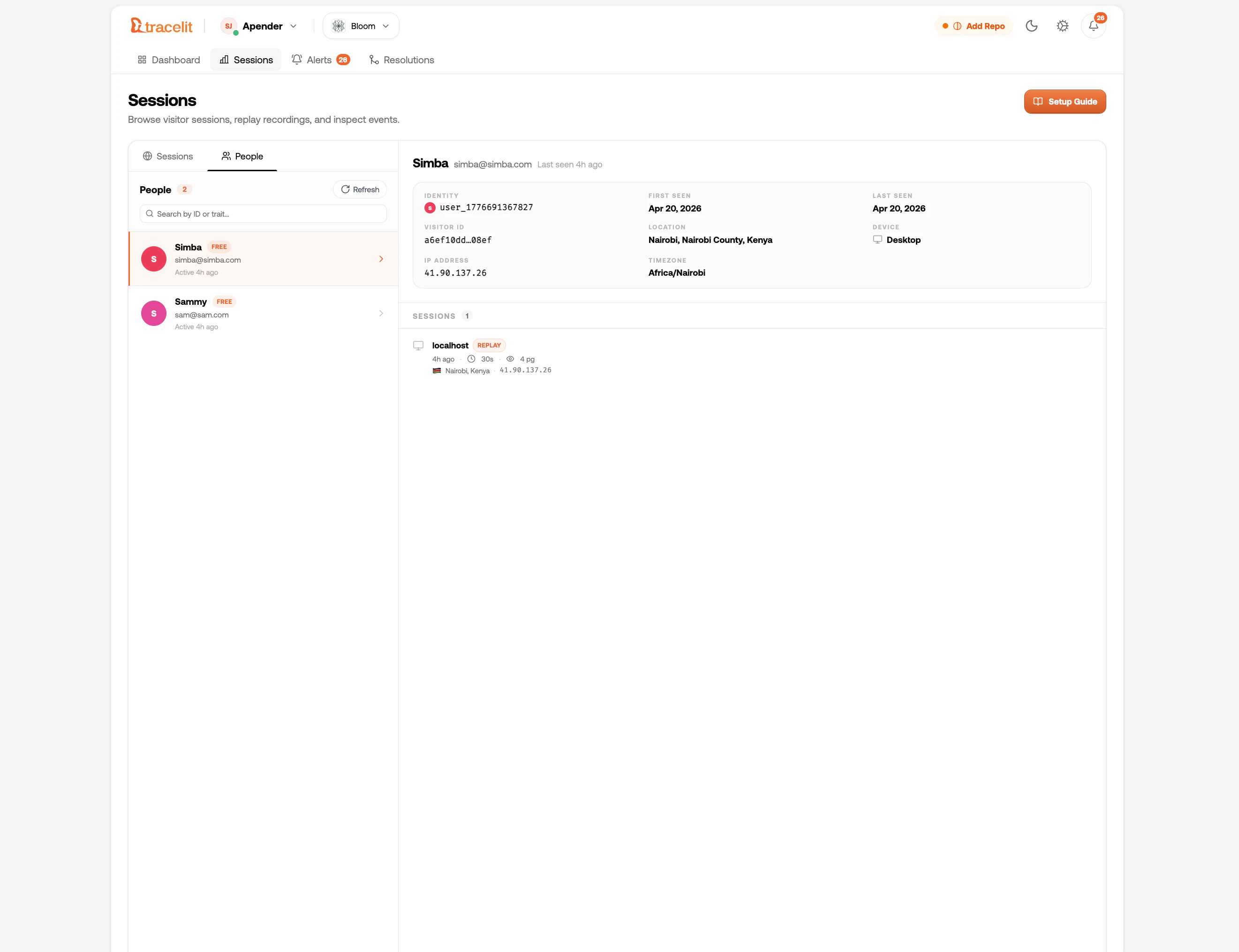
> Link anonymous sessions to real users in your system with one line of code. Filter replays, errors, and analytics by user ID or traits like email and plan.
By default, Tracelit tracks anonymous sessions. If you call `identify()` after a user logs in, every event from that point on (and future sessions on that device) will be linked to that user in your dashboard.
 ***
## Basic usage
Call `identify()` as soon as you know who the user is — after login, after an auth check, or anywhere you have access to their ID.
```ts theme={null}
import { identify } from '@tracelit/tracker'
identify('user_abc123')
```
Pass optional traits as a second argument — any key-value pairs you want visible in the dashboard:
```ts theme={null}
identify('user_abc123', {
email: 'alice@example.com',
plan: 'pro',
company: 'Acme Corp',
})
```
You don't have to send an email. The user ID can be any string — a database UUID, a hashed value, a display name. Email is just an optional trait.
***
## What happens in the dashboard
After calling `identify()`:
* Sessions show a **user chip** — click it to see all sessions for that user
* Filter the sessions list and error log by user ID or email trait
* The replay player header shows the identified user's ID and traits
* The replay timeline shows a **Identified as user\_abc123** marker at the exact moment `identify()` was called
* Errors are linked to the user, so you can see all errors a specific person experienced
***
## Reset on logout
Call `reset()` when the user logs out. This clears the stored identity so future sessions are anonymous again.
```ts theme={null}
import { reset } from '@tracelit/tracker'
reset()
```
The identity is stored in `localStorage` and persists across page loads. If you don't call `reset()`, the next session on the same device will still be linked to the same user.
***
## React example
```tsx theme={null}
import { useEffect } from 'react'
import { identify, reset } from '@tracelit/tracker'
function useTracelitIdentity(user: { id: string; email: string; plan: string } | null) {
useEffect(() => {
if (user) {
identify(user.id, { email: user.email, plan: user.plan })
} else {
reset() // user logged out
}
}, [user])
}
// Use it in your root component alongside your auth hook:
function App() {
const { user } = useAuth()
useTracelitIdentity(user)
return
}
```
***
## Next.js App Router example
Split the init and identity concerns into two components — keeps things clean:
```tsx theme={null}
// components/TracelitIdentity.tsx
'use client'
import { useEffect } from 'react'
import { identify, reset } from '@tracelit/tracker'
export function TracelitIdentity({
userId,
traits,
}: {
userId?: string
traits?: Record
}) {
useEffect(() => {
if (userId) {
identify(userId, traits)
} else {
reset()
}
}, [userId])
return null
}
```
```tsx theme={null}
// app/layout.tsx
import { Tracelit } from '@/components/Tracelit'
import { TracelitIdentity } from '@/components/TracelitIdentity'
import { getServerSession } from 'next-auth'
export default async function RootLayout({ children }: { children: React.ReactNode }) {
const session = await getServerSession()
return (
{children}
)
}
```
***
## Script tag (plain HTML)
If you're using the script tag approach, you can call `identify()` on the global `__tl` object — it's safe to call before the SDK finishes loading:
```html theme={null}
```
***
## Privacy notes
The user ID and traits you pass are stored on your Tracelit project. Nothing is inferred — Tracelit only stores exactly what you send.
Yes, as long as you treat it like any other user data. If a user requests deletion, delete their record via the Tracelit dashboard. Call `reset()` client-side on logout so no future sessions are linked to them on that device.
Absolutely. The `email` trait is optional, and you can pass any opaque key as the user ID. A SHA-256 hashed email or a database UUID both work fine.
In `debug` mode, the SDK warns you if a trait key looks sensitive — for example, `password`, `token`, `card`, or `ssn`. These warnings appear in the browser console.
***
## Use this AI prompt
```text theme={null}
Implement Tracelit user identification in my project.
Requirements:
1) Call identify(userId, traits) immediately after login/auth success.
2) Call reset() on logout so future sessions are anonymous.
3) Keep traits minimal and safe (no password, token, card, ssn, or secret values).
4) If this is React/Next/Vue/Svelte/Angular, implement in the app root/auth flow.
5) If this is plain HTML, use __tl.identify(...) after /api/me resolves.
6) Make minimal, production-safe changes only.
7) Show exactly which files changed and the final code snippets.
8) Add a quick verification checklist for the Tracelit dashboard:
- User chip visible on session
- Identify marker visible in replay timeline
- reset() clears identity after logout
```
***
## API reference
| Function | Description |
| --------------------------- | ---------------------------------------------------------------------------- |
| `identify(userId, traits?)` | Link the current session (and all future sessions on this device) to a user. |
| `reset()` | Clear the stored user identity. Call on logout. |
***
## Basic usage
Call `identify()` as soon as you know who the user is — after login, after an auth check, or anywhere you have access to their ID.
```ts theme={null}
import { identify } from '@tracelit/tracker'
identify('user_abc123')
```
Pass optional traits as a second argument — any key-value pairs you want visible in the dashboard:
```ts theme={null}
identify('user_abc123', {
email: 'alice@example.com',
plan: 'pro',
company: 'Acme Corp',
})
```
You don't have to send an email. The user ID can be any string — a database UUID, a hashed value, a display name. Email is just an optional trait.
***
## What happens in the dashboard
After calling `identify()`:
* Sessions show a **user chip** — click it to see all sessions for that user
* Filter the sessions list and error log by user ID or email trait
* The replay player header shows the identified user's ID and traits
* The replay timeline shows a **Identified as user\_abc123** marker at the exact moment `identify()` was called
* Errors are linked to the user, so you can see all errors a specific person experienced
***
## Reset on logout
Call `reset()` when the user logs out. This clears the stored identity so future sessions are anonymous again.
```ts theme={null}
import { reset } from '@tracelit/tracker'
reset()
```
The identity is stored in `localStorage` and persists across page loads. If you don't call `reset()`, the next session on the same device will still be linked to the same user.
***
## React example
```tsx theme={null}
import { useEffect } from 'react'
import { identify, reset } from '@tracelit/tracker'
function useTracelitIdentity(user: { id: string; email: string; plan: string } | null) {
useEffect(() => {
if (user) {
identify(user.id, { email: user.email, plan: user.plan })
} else {
reset() // user logged out
}
}, [user])
}
// Use it in your root component alongside your auth hook:
function App() {
const { user } = useAuth()
useTracelitIdentity(user)
return
}
```
***
## Next.js App Router example
Split the init and identity concerns into two components — keeps things clean:
```tsx theme={null}
// components/TracelitIdentity.tsx
'use client'
import { useEffect } from 'react'
import { identify, reset } from '@tracelit/tracker'
export function TracelitIdentity({
userId,
traits,
}: {
userId?: string
traits?: Record
}) {
useEffect(() => {
if (userId) {
identify(userId, traits)
} else {
reset()
}
}, [userId])
return null
}
```
```tsx theme={null}
// app/layout.tsx
import { Tracelit } from '@/components/Tracelit'
import { TracelitIdentity } from '@/components/TracelitIdentity'
import { getServerSession } from 'next-auth'
export default async function RootLayout({ children }: { children: React.ReactNode }) {
const session = await getServerSession()
return (
{children}
)
}
```
***
## Script tag (plain HTML)
If you're using the script tag approach, you can call `identify()` on the global `__tl` object — it's safe to call before the SDK finishes loading:
```html theme={null}
```
***
## Privacy notes
The user ID and traits you pass are stored on your Tracelit project. Nothing is inferred — Tracelit only stores exactly what you send.
Yes, as long as you treat it like any other user data. If a user requests deletion, delete their record via the Tracelit dashboard. Call `reset()` client-side on logout so no future sessions are linked to them on that device.
Absolutely. The `email` trait is optional, and you can pass any opaque key as the user ID. A SHA-256 hashed email or a database UUID both work fine.
In `debug` mode, the SDK warns you if a trait key looks sensitive — for example, `password`, `token`, `card`, or `ssn`. These warnings appear in the browser console.
***
## Use this AI prompt
```text theme={null}
Implement Tracelit user identification in my project.
Requirements:
1) Call identify(userId, traits) immediately after login/auth success.
2) Call reset() on logout so future sessions are anonymous.
3) Keep traits minimal and safe (no password, token, card, ssn, or secret values).
4) If this is React/Next/Vue/Svelte/Angular, implement in the app root/auth flow.
5) If this is plain HTML, use __tl.identify(...) after /api/me resolves.
6) Make minimal, production-safe changes only.
7) Show exactly which files changed and the final code snippets.
8) Add a quick verification checklist for the Tracelit dashboard:
- User chip visible on session
- Identify marker visible in replay timeline
- reset() clears identity after logout
```
***
## API reference
| Function | Description |
| --------------------------- | ---------------------------------------------------------------------------- |
| `identify(userId, traits?)` | Link the current session (and all future sessions on this device) to a user. |
| `reset()` | Clear the stored user identity. Call on logout. |