> ## Documentation Index
> Fetch the complete documentation index at: https://docs.tracelit.io/llms.txt
> Use this file to discover all available pages before exploring further.
# GitHub PR
> Connect your GitHub repository to a Tracelit service and let incidents become pull requests automatically. Review, merge, or auto-merge — your call.
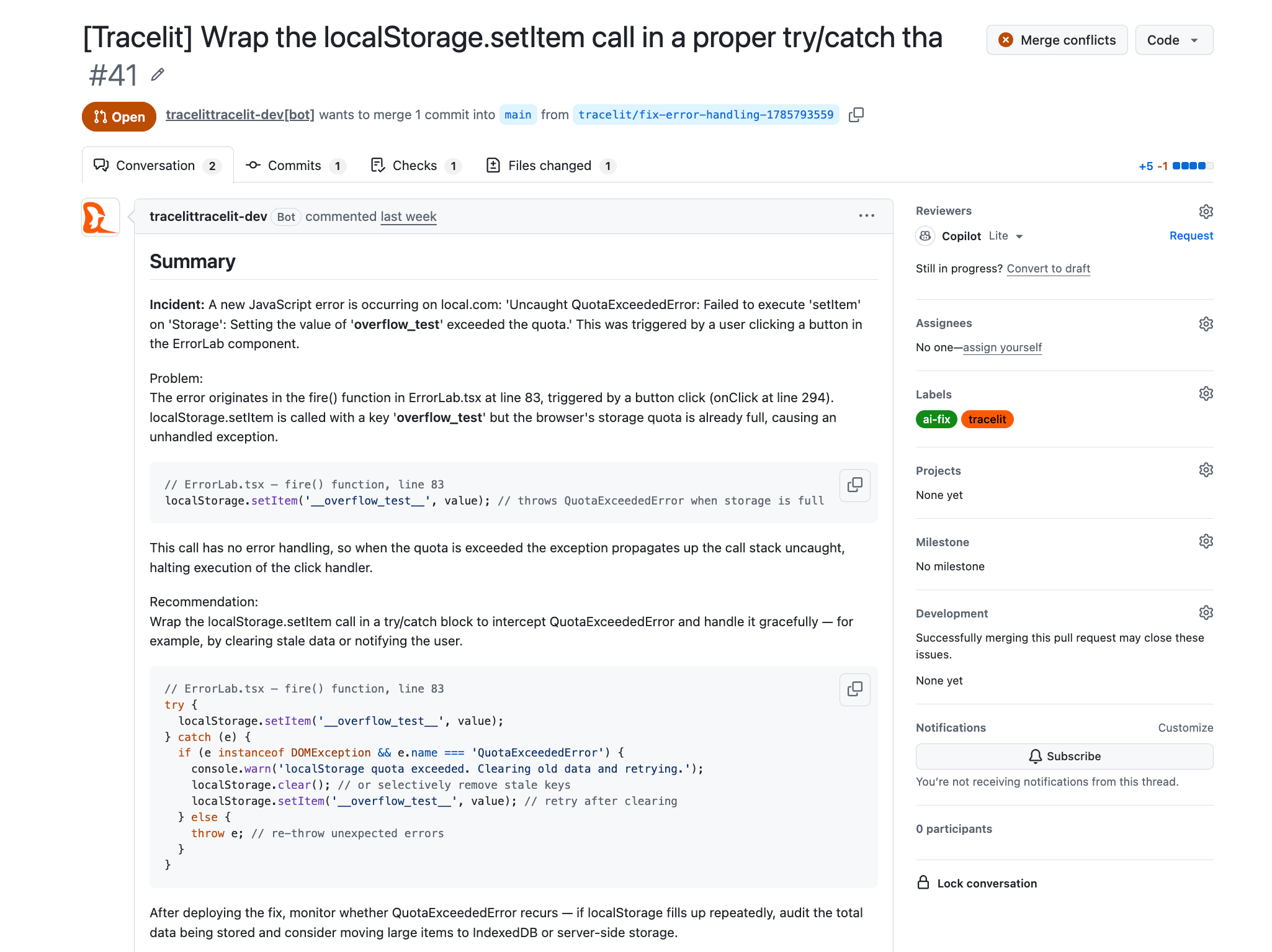
When a GitHub repository is linked to a Tracelit service, every incident can become a ready-to-review pull request — automatically. Tracelit analyzes the failing trace, reads the relevant code paths, writes a minimal fix, and opens a PR with a root-cause summary, confidence score, and a direct link back to the incident.
 ***
## Connect GitHub
Go to **Settings → Integrations → GitHub** and click **Install GitHub App**. Authorize Tracelit to access the repositories you want to connect.
Select the site or service, open **Utilities → Repository**, link the repo, and map Development / Production branches.
Under **Utilities → Environment**, turn on **Allow resolutions** (and code analysis for backend services) for the environments you trust.
For the full agentic loop, see [Resolutions](/agentic/resolutions).
***
## How the fix flow works
An error spike, new exception, or anomaly is detected and an incident is created.
Tracelit pulls the triggering trace, stack trace, and relevant source files from your linked repo.
The AI analyzes the root cause and produces the smallest safe diff needed to resolve it.
A PR is opened on a fresh branch with the diff, a root-cause summary, a confidence score, and a link to the incident and trace.
You review and merge the PR normally, or enable auto-merge to let Tracelit merge automatically once CI passes and confidence meets your threshold.
Tracelit never pushes directly to your default branch. Every fix lands on a separate branch and goes through your normal PR process.
***
## Auto-merge
Auto-merge lets Tracelit close the loop entirely for high-confidence fixes. Configure it per service:
| Setting | Description |
| ------------------------ | ------------------------------------------------------------------------ |
| **Disabled** (default) | PR is opened and waits for your review |
| **Enabled** | Tracelit merges the PR after CI passes if confidence meets the threshold |
| **Confidence threshold** | Minimum confidence score (0–100) required before auto-merge is allowed |
Branch protection rules and required checks are always respected — auto-merge queues behind them, it does not bypass them.
***
## PR webhook reconciliation
Tracelit listens to GitHub webhook events on your linked repositories. The incident and resolution job update automatically as you work:
| GitHub event | Tracelit action |
| --------------------------- | --------------------------------------------------------- |
| PR merged | Incident marked resolved; resolution job closed as merged |
| PR closed (without merge) | Resolution job marked dismissed |
| Review submitted | Confidence and review status updated on the job |
| New commit pushed to branch | Re-evaluates auto-merge eligibility |
***
## Manual fix
You can also trigger a fix manually from any open incident — useful when auto-triggering is off or you want to re-generate a fix after changing code:
1. Open the incident in **Observability → Incidents**
2. Click **Create fix**
3. Tracelit queues a new resolution job and opens a PR within minutes
***
## Learn more
| Topic | Description | Guide |
| -------------------------------------------------- | ------------------------------------------------------------- | ------------------------------- |
| **Incidents** | How Tracelit detects and manages backend incidents. | [Read](/features/incidents) |
| **AI resolution** | The same fix flow for frontend errors — session replay to PR. | [Read](/features/ai-resolution) |
***
## Connect GitHub
Go to **Settings → Integrations → GitHub** and click **Install GitHub App**. Authorize Tracelit to access the repositories you want to connect.
Select the site or service, open **Utilities → Repository**, link the repo, and map Development / Production branches.
Under **Utilities → Environment**, turn on **Allow resolutions** (and code analysis for backend services) for the environments you trust.
For the full agentic loop, see [Resolutions](/agentic/resolutions).
***
## How the fix flow works
An error spike, new exception, or anomaly is detected and an incident is created.
Tracelit pulls the triggering trace, stack trace, and relevant source files from your linked repo.
The AI analyzes the root cause and produces the smallest safe diff needed to resolve it.
A PR is opened on a fresh branch with the diff, a root-cause summary, a confidence score, and a link to the incident and trace.
You review and merge the PR normally, or enable auto-merge to let Tracelit merge automatically once CI passes and confidence meets your threshold.
Tracelit never pushes directly to your default branch. Every fix lands on a separate branch and goes through your normal PR process.
***
## Auto-merge
Auto-merge lets Tracelit close the loop entirely for high-confidence fixes. Configure it per service:
| Setting | Description |
| ------------------------ | ------------------------------------------------------------------------ |
| **Disabled** (default) | PR is opened and waits for your review |
| **Enabled** | Tracelit merges the PR after CI passes if confidence meets the threshold |
| **Confidence threshold** | Minimum confidence score (0–100) required before auto-merge is allowed |
Branch protection rules and required checks are always respected — auto-merge queues behind them, it does not bypass them.
***
## PR webhook reconciliation
Tracelit listens to GitHub webhook events on your linked repositories. The incident and resolution job update automatically as you work:
| GitHub event | Tracelit action |
| --------------------------- | --------------------------------------------------------- |
| PR merged | Incident marked resolved; resolution job closed as merged |
| PR closed (without merge) | Resolution job marked dismissed |
| Review submitted | Confidence and review status updated on the job |
| New commit pushed to branch | Re-evaluates auto-merge eligibility |
***
## Manual fix
You can also trigger a fix manually from any open incident — useful when auto-triggering is off or you want to re-generate a fix after changing code:
1. Open the incident in **Observability → Incidents**
2. Click **Create fix**
3. Tracelit queues a new resolution job and opens a PR within minutes
***
## Learn more
| Topic | Description | Guide |
| -------------------------------------------------- | ------------------------------------------------------------- | ------------------------------- |
| **Incidents** | How Tracelit detects and manages backend incidents. | [Read](/features/incidents) |
| **AI resolution** | The same fix flow for frontend errors — session replay to PR. | [Read](/features/ai-resolution) |