> ## Documentation Index
> Fetch the complete documentation index at: https://docs.tracelit.io/llms.txt
> Use this file to discover all available pages before exploring further.
# Feature tagging
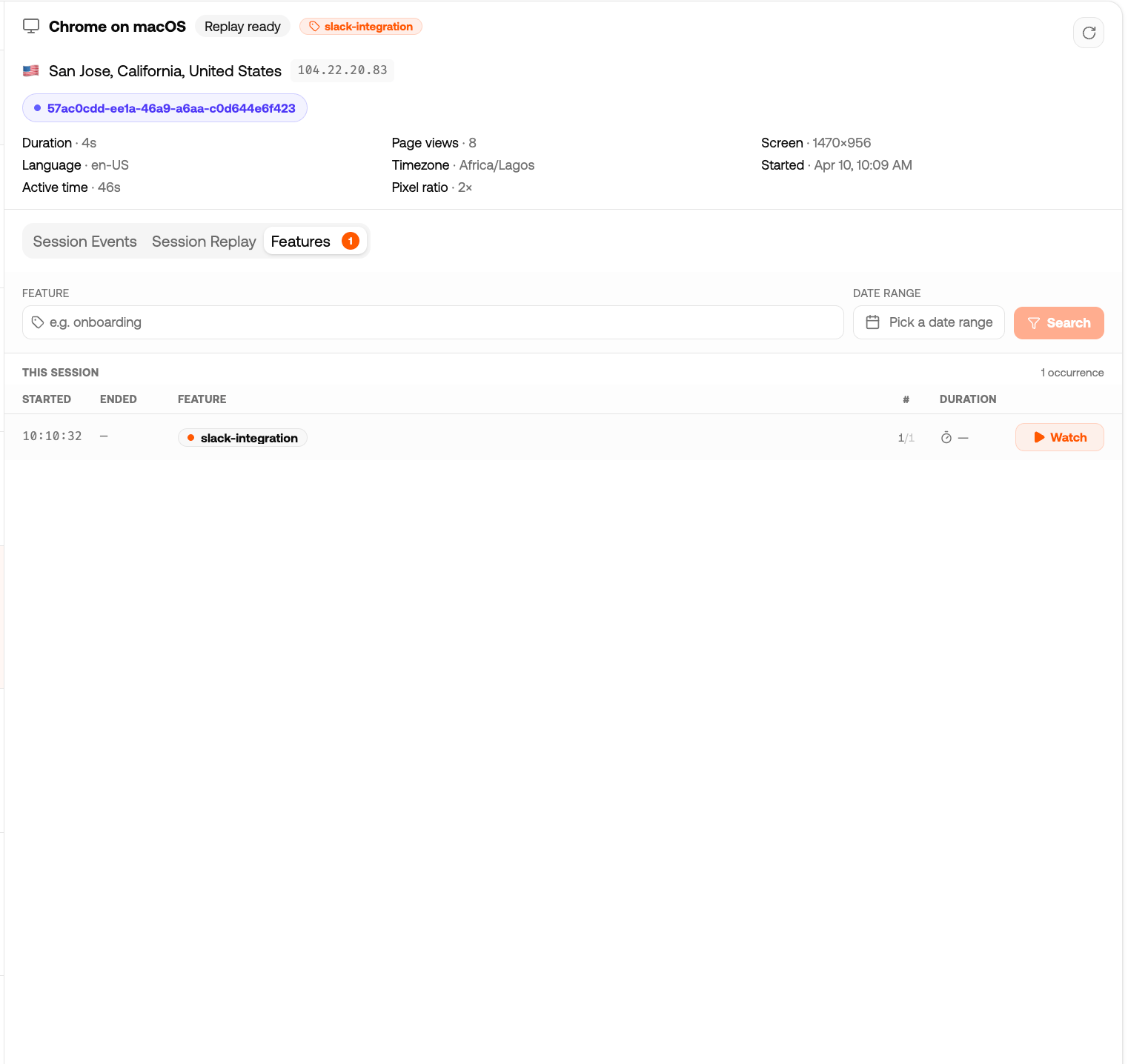
> Annotate session replays with named feature markers — checkout, onboarding, payment. Filter sessions by feature and jump to the exact timestamp it started.
Feature tagging lets you annotate session replays with named markers. When a user hits your checkout flow, onboarding wizard, or any other important flow, you call `startReplay('checkout')` — and in the dashboard you'll see every session tagged with `checkout`, with a clickable timestamp that jumps the player to that exact moment.
 ***
## Basic usage
```ts theme={null}
import { startReplay, stopReplay } from '@tracelit/tracker'
// Mark the start of a feature
startReplay('checkout')
// Mark the end
stopReplay('checkout')
```
You can use any string as a feature name — keep them short and descriptive:
```ts theme={null}
startReplay('onboarding')
startReplay('payment-flow')
startReplay('settings-update')
startReplay('trial-upgrade')
```
***
## React example — tag a component lifecycle
The most natural place to call these in React is inside a `useEffect` in the component that represents the flow:
```tsx theme={null}
import { useEffect } from 'react'
import { startReplay, stopReplay } from '@tracelit/tracker'
function CheckoutFlow() {
useEffect(() => {
startReplay('checkout')
return () => stopReplay('checkout') // called when user leaves
}, [])
return
}
```
When the user mounts `CheckoutFlow`, a `checkout` tag appears in the session. When they leave (or the component unmounts), the tag closes. In the dashboard you'll see the exact duration they spent in checkout.
***
## Next.js example — tag a page or route group
```tsx theme={null}
// app/checkout/layout.tsx
'use client'
import { useEffect } from 'react'
import { startReplay, stopReplay } from '@tracelit/tracker'
export default function CheckoutLayout({ children }: { children: React.ReactNode }) {
useEffect(() => {
startReplay('checkout')
return () => stopReplay('checkout')
}, [])
return <>{children}
}
```
***
## Multiple concurrent tags
You can have multiple active tags at once — Tracelit stacks them:
```ts theme={null}
startReplay('checkout')
startReplay('upsell-offer') // user sees an upsell mid-checkout
// Later...
stopReplay('upsell-offer') // upsell dismissed, still in checkout
stopReplay('checkout') // checkout complete
```
Check what's currently active:
```ts theme={null}
import { getActiveFeatures } from '@tracelit/tracker'
console.log(getActiveFeatures())
// → ['checkout', 'upsell-offer']
```
***
## Trigger mode + feature tagging
If you set `replay.mode: 'trigger'`, recording **only starts** when you call `startReplay()`. This is useful on high-traffic sites where you only want recordings of specific flows:
```ts theme={null}
import { init, startReplay, stopReplay } from '@tracelit/tracker'
init({
token: 'YOUR_TOKEN_HERE',
environment: 'production',
replay: { mode: 'trigger' } // record nothing until startReplay() is called
})
// Somewhere in your checkout component:
startReplay('checkout') // recording begins here
stopReplay('checkout') // recording pauses here
```
## If all features are stopped, the pipeline flushes and recording pauses until the next `startReplay()` call.
## API reference
| Function | Description |
| ----------------------- | -------------------------------------------------------------------------------------- |
| `startReplay(feature?)` | Start a named feature segment. Injects a `tl:feature_start` marker into the recording. |
| `stopReplay(feature?)` | End a named feature segment. Injects a `tl:feature_end` marker. |
| `getActiveFeatures()` | Returns an array of currently active feature tag strings. |
***
## Use this AI prompt
```text theme={null}
Add Tracelit feature tagging in my project.
Requirements:
1) Tag my main product flows with startReplay()/stopReplay(), including: onboarding, checkout, and settings-update.
2) In React/Next components, start on mount and stop on unmount.
3) Avoid duplicate tags and keep names consistent.
4) Keep code changes minimal and production-safe.
5) Show exactly which files you changed.
6) Add a quick test plan for verifying tags appear in Tracelit replay.
```
***
## Basic usage
```ts theme={null}
import { startReplay, stopReplay } from '@tracelit/tracker'
// Mark the start of a feature
startReplay('checkout')
// Mark the end
stopReplay('checkout')
```
You can use any string as a feature name — keep them short and descriptive:
```ts theme={null}
startReplay('onboarding')
startReplay('payment-flow')
startReplay('settings-update')
startReplay('trial-upgrade')
```
***
## React example — tag a component lifecycle
The most natural place to call these in React is inside a `useEffect` in the component that represents the flow:
```tsx theme={null}
import { useEffect } from 'react'
import { startReplay, stopReplay } from '@tracelit/tracker'
function CheckoutFlow() {
useEffect(() => {
startReplay('checkout')
return () => stopReplay('checkout') // called when user leaves
}, [])
return
}
```
When the user mounts `CheckoutFlow`, a `checkout` tag appears in the session. When they leave (or the component unmounts), the tag closes. In the dashboard you'll see the exact duration they spent in checkout.
***
## Next.js example — tag a page or route group
```tsx theme={null}
// app/checkout/layout.tsx
'use client'
import { useEffect } from 'react'
import { startReplay, stopReplay } from '@tracelit/tracker'
export default function CheckoutLayout({ children }: { children: React.ReactNode }) {
useEffect(() => {
startReplay('checkout')
return () => stopReplay('checkout')
}, [])
return <>{children}
}
```
***
## Multiple concurrent tags
You can have multiple active tags at once — Tracelit stacks them:
```ts theme={null}
startReplay('checkout')
startReplay('upsell-offer') // user sees an upsell mid-checkout
// Later...
stopReplay('upsell-offer') // upsell dismissed, still in checkout
stopReplay('checkout') // checkout complete
```
Check what's currently active:
```ts theme={null}
import { getActiveFeatures } from '@tracelit/tracker'
console.log(getActiveFeatures())
// → ['checkout', 'upsell-offer']
```
***
## Trigger mode + feature tagging
If you set `replay.mode: 'trigger'`, recording **only starts** when you call `startReplay()`. This is useful on high-traffic sites where you only want recordings of specific flows:
```ts theme={null}
import { init, startReplay, stopReplay } from '@tracelit/tracker'
init({
token: 'YOUR_TOKEN_HERE',
environment: 'production',
replay: { mode: 'trigger' } // record nothing until startReplay() is called
})
// Somewhere in your checkout component:
startReplay('checkout') // recording begins here
stopReplay('checkout') // recording pauses here
```
## If all features are stopped, the pipeline flushes and recording pauses until the next `startReplay()` call.
## API reference
| Function | Description |
| ----------------------- | -------------------------------------------------------------------------------------- |
| `startReplay(feature?)` | Start a named feature segment. Injects a `tl:feature_start` marker into the recording. |
| `stopReplay(feature?)` | End a named feature segment. Injects a `tl:feature_end` marker. |
| `getActiveFeatures()` | Returns an array of currently active feature tag strings. |
***
## Use this AI prompt
```text theme={null}
Add Tracelit feature tagging in my project.
Requirements:
1) Tag my main product flows with startReplay()/stopReplay(), including: onboarding, checkout, and settings-update.
2) In React/Next components, start on mount and stop on unmount.
3) Avoid duplicate tags and keep names consistent.
4) Keep code changes minimal and production-safe.
5) Show exactly which files you changed.
6) Add a quick test plan for verifying tags appear in Tracelit replay.
```